SmartTrim
For an overview, including what SmartTrim is not and suggested settings for 16 GB and 32 GB systems, see SmartTrim: Process Lasso's memory trimming, explained.
- Menu path: ‘Options / Memory / SmartTrim Options …’
SmartTrim is an intelligent memory management algorithm that can trim working sets on a per-process basis when thresholds are reached, and can also clear the system standby list (cache).
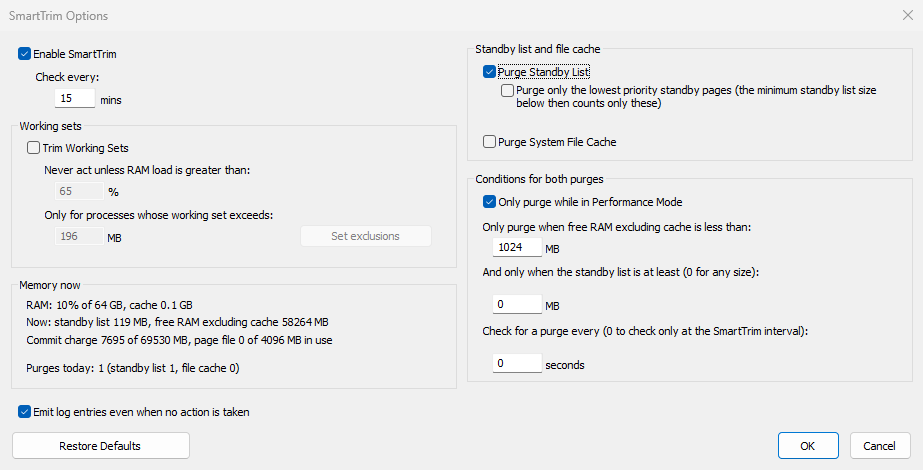
The SmartTrim Options Dialog
The dialog has two columns. On the left: Enable SmartTrim and Check every (the SmartTrim interval, in minutes), the Working sets group, and the Memory now box. On the right: the Standby list and file cache group, with the two purges, and the Conditions for both purges group.
Beta
The two-column layout, the Conditions for both purges group, Purges today, the standby list size condition, the check in seconds, the lowest priority purge, the Memory now box with its commit charge and page file line, and Restore Defaults are in the current Process Lasso beta versions and arrive in the next final release.
Memory now is filled when the dialog opens and updates every second. It shows the RAM load and cache, the current standby list size and free RAM excluding cache, the commit charge and page file use (or "no page file"), and Purges today: how many standby list and file cache purges ran since midnight. Purges today counts every purge, by SmartTrim's checks, Trim Now and Purge Standby List Now, whether or not SmartTrim logging is on. The counts are kept in the registry for the last 7 days.
Standby List Purges
The Standby list and file cache group has the two purges, Purge Standby List and Purge System File Cache. Purge only the lowest priority standby pages applies to the standby list purge only: it purges only the standby pages Windows ranks lowest (priority 0) and keeps the rest of the standby list. With it checked, the standby list size condition counts only those pages.
The Conditions for both purges group applies to both purges. SmartTrim purges when all of these are true:
- Only purge while in Performance Mode, when checked: Performance Mode is engaged.
- Free RAM excluding cache (the free and zero page lists) is less than the amount you set.
- The standby list is at least the size you set. 0 means any size.
By default, SmartTrim checks these conditions once per SmartTrim interval (Check every). To check more often, set Check for a purge every to a number of seconds (0 checks only at the SmartTrim interval). The standby list check then runs on its own, and working set trims keep the SmartTrim interval.
With Check for a purge every set, SmartTrim logs purges only, not the checks where nothing was purged, and writes at most one purge entry a minute; that entry says how many purges since the last entry were not logged. It also doesn't purge a standby list smaller than 64 MB.
Restore Defaults puts every option in this dialog back to its default, except Enable SmartTrim and the exclusions. Nothing is saved until you click OK.
Purge Standby List Now (Memory menu) always purges the whole standby list, whatever the lowest priority option says, and writes a log entry like a Trim Now purge.